


Moon+ Reader
3.515.13K Reviews
App Specs
- Version
- 10.7
- Updated On
- License
- Free
- Downloads
- 10,000,000+
- Developer
- Moon+
- Categories
- Books & Reference
- Platform
- Android
Screenshots
 Analysis by AppCompare
I judge an ebook reader by a few practical questions: can it handle the files I already have, can I make a page comfortable to read for more than a few minutes, and can I find my place again without a fuss? Moon+ Reader is aimed at people who want control over those details rather than a bare screen for opening a book. In my experience, that makes it worth considering if you read across a personal collection and enjoy adjusting the setup to suit each book.
It is a free reading app from Moon+, in the Books & Reference category, and it has been around since Aug 7, 2010. The current version is 10.6, with Android 5.0 as the minimum requirement. Its 3.5 average from around 270,000 ratings, alongside more than 10 million installs, suggests a widely used app that does not satisfy every reader equally. I would treat that as a reason to decide based on your own habits, not as a verdict on whether it will suit you.
Start with your reading habits
Before choosing a reader, think about what you actually open. If most of your reading happens inside one publisher’s or bookstore’s ecosystem, its own app may be simpler: your purchases and reading position are already tied to that service. If you keep books in different formats, prefer a personal library, or want to tune the page itself, a dedicated reader such as Moon+ Reader can make more sense.
The key trade-off is flexibility versus simplicity. A reader with lots of controls can be wonderfully adaptable, but it also asks you to spend time setting things up. Someone who wants to tap a purchased title and start reading may find a simpler bookstore app less distracting. I see Moon+ Reader as a better fit for readers who consider the reading environment part of the experience, not just a screen between them and the text.
Features That Shine Bright
Moon+ Reader is packed with features that cater to both casual readers and bookworms. One of the first things you'll notice is its versatile file support. It handles a wide array of formats including EPUB, PDF, MOBI, and more. So, whether you’re a fan of classics or the latest bestsellers, you're covered.
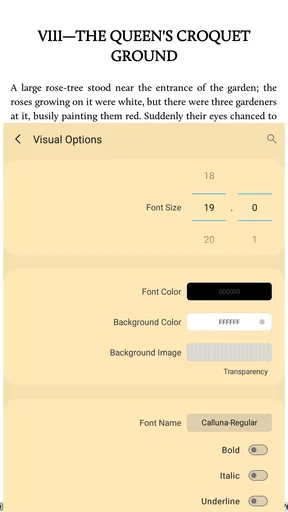
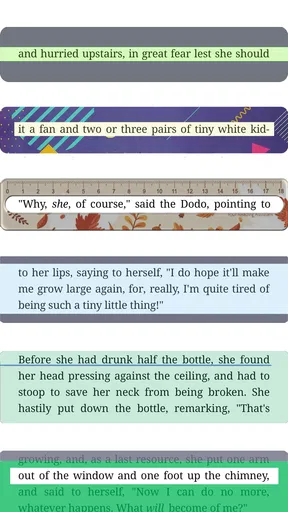
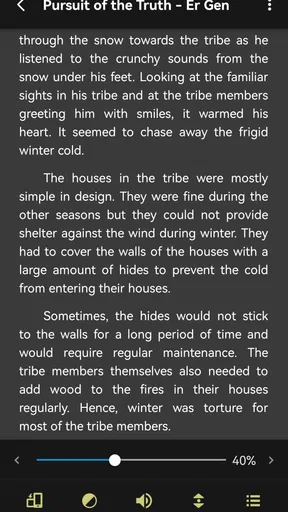
Now, let's talk customization. This app allows you to tweak your reading experience down to the smallest detail. You can adjust font sizes, styles, and even the spacing. It’s a bit like being a kid in a candy store, where you’re the boss of your own reading universe. And if you’re a night owl like me, the night mode is a lifesaver. No more eye strain when you're sneaking in a few pages under the covers!
One of my favorite features has to be the “auto-scroll.” Imagine reading without having to swipe or tap every few seconds. It’s like magic, especially when you’re cozy and don’t want to move a muscle. Plus, you can customize the speed to match your reading pace. Talk about a personalized experience!
Worth Reading Before You Choose

Flipboard Shows What News Apps Must Do Beyond the Feed

Switching to Android Auto Means Rethinking Your Driving Routine

Google Calendar Makes a Crowded Week Easier to Manage

Ludo King Makes the Most of the Minutes Between Plans

Baby Panda World Brings Quick Play to Modern Phones, but Its Game Library Feels Busy

ESPN’s Live Game View Makes Following Close Games Easier
Give your library a quick test
File support is useful, but I would not assume that every book will look equally good just because its format opens. A reflowable ebook is generally easier to adapt to different screens than a fixed-layout page. For a novel, changing type size and spacing can make a small phone far more comfortable. For a PDF with a complex page design, the original layout may still require zooming or scrolling, which is less pleasant on a narrow display.
My practical advice is to test a few representative titles before moving a whole collection. Open one ordinary EPUB, one document with images or unusual formatting, and a PDF if you read those. Check whether chapter breaks, italics, and page layout look right, then adjust the display once rather than repeatedly changing it mid-book. This small trial helps answer the important question: not just whether the app opens your files, but whether you enjoy reading them there.
Seamless Integration and Cloud Sync
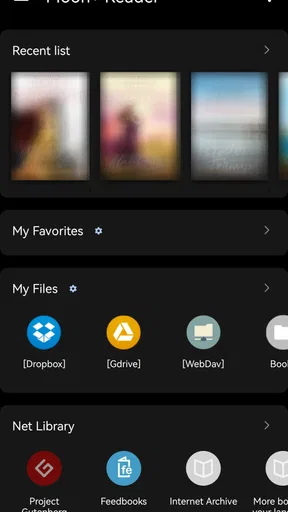
Let’s face it, juggling multiple devices is the norm these days. Luckily, Moon+ Reader has got us covered with its cloud sync feature. You can easily pick up where you left off, whether you’re on your phone, tablet, or any other device. It syncs through Dropbox and Google Drive, making it super convenient to access your library from anywhere.
The app also integrates smoothly with online libraries. So, if you’re in the mood for some new reads, you can browse and download books without leaving the app. It’s like having a bookstore in your pocket, anytime you need it!
Make syncing part of a routine
Sync is most valuable when you treat it as a workflow rather than a rescue button. If you switch devices, let the reading position update before putting the first one away, then open the book on the second device and check that the correct passage appears. That simple habit can prevent the annoying moment of searching around to work out where you stopped.
Cloud storage also makes it easier to keep a library available across devices, but it introduces a little housekeeping. Use a consistent folder structure and avoid keeping several near-identical copies of the same title if you can help it; otherwise, locating the right edition can become harder than finding your place in the book. If you read on only one device, syncing may not matter much, and you can choose a reader based on its local-library experience instead.
User-Friendly Interface
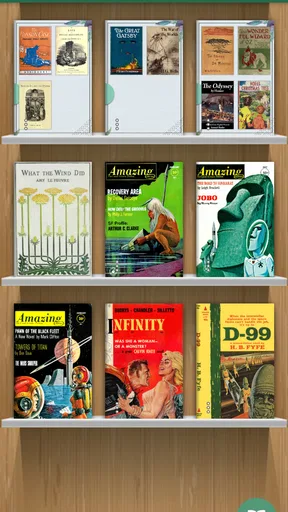
One of the things I truly appreciate about Moon+ Reader is its intuitive interface. It’s sleek, modern, and doesn’t overwhelm you with unnecessary clutter. Navigating through your library is a breeze. You can sort, search, and organize your books in a way that makes sense to you. Plus, the bookshelf view is not only functional but also visually appealing.
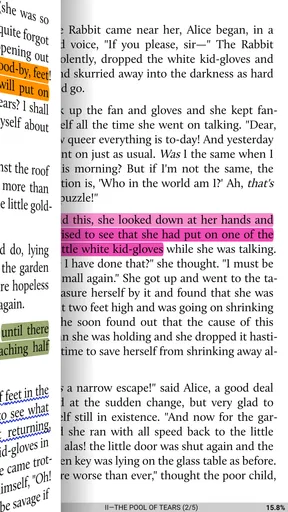
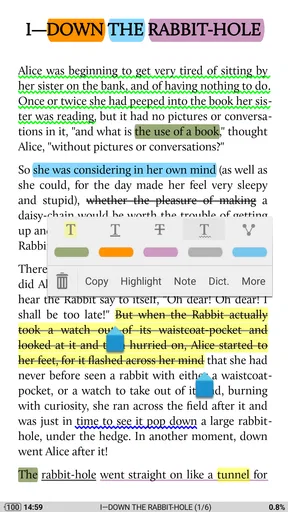
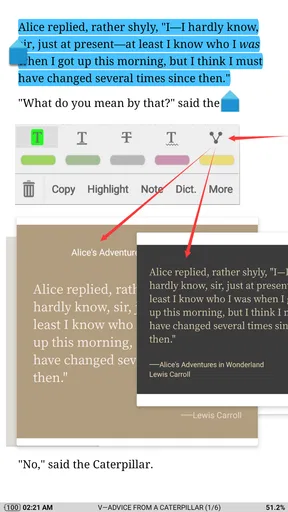
There’s also a nifty feature where you can add bookmarks, highlight text, and jot down notes. It’s perfect for those moments when you come across a quote or idea that resonates with you. And the best part? You can easily export these notes if you want to revisit them later.
Use notes without interrupting the book
For study or reference reading, bookmarks and highlights are more useful when they follow a simple system. I would bookmark the start of a chapter, highlight only passages I expect to revisit, and add a short note explaining why a passage matters. That makes exported notes easier to use later than a long collection of highlights with no context. For a novel, I would be more selective: marking a favorite line now and then can be enjoyable, but turning every page into an annotation project can slow the reading itself.
This is also where a dedicated reader differs from a basic file viewer. It gives you tools to build a record of your reading, but those tools only help if you are willing to maintain that record. If your main goal is to mark up documents collaboratively or work through complex research materials, a specialist study or PDF tool may suit that task better. Moon+ Reader is most appealing when notes support personal reading rather than replace a full academic workflow.
Reading Stats and Achievements
Who doesn’t love a little motivation? Moon+ Reader keeps track of your reading habits and provides stats like reading time, speed, and more. If you’re competitive or simply enjoy setting goals, you’ll love the achievement system. It’s a fun way to challenge yourself and stay engaged with your reading journey.
Where a different reader may be better
Stats can help me notice whether I am making time to read, but I would use them as a gentle prompt rather than a measure of success. Reading speed is not a useful target for every book: a dense nonfiction chapter may deserve pauses, while a light story might naturally move faster. If tracking turns reading into a chore, it is easy to ignore those numbers and enjoy the book instead.
The choice also depends on where your books come from. If you mainly buy titles through a particular bookstore, that store’s app may offer a more direct route from purchase to reading, with less manual library management. If you borrow through a library service, its own app may be the easiest way to browse and manage loans. Moon+ Reader is a stronger candidate when you already have compatible files or want one flexible place for a mixed collection; it is not automatically the best hub for every source of books.
A realistic day with the app
Picture a commute where you read a few pages on your phone, pause when you reach your stop, and continue at home on a larger screen. A reader that remembers your position and lets you adjust text to each screen can make that routine smoother. Later, you might save a passage from a nonfiction book and export the note when you have time to review it. Those are ordinary, practical reasons to value device continuity and reading tools more than a flashy storefront.
There is a trade-off in that convenience: you need to keep the same book accessible on both devices and give syncing a moment to catch up. If your commute is offline or your routine rarely changes devices, a local copy and a bookmark may be enough. I would first test the exact handoff that matters to you rather than assume that cloud features alone will make every transition effortless.
Cost, setup, and the decision to switch
The app is free to install, and optional in-app purchases are listed at $0.99 per item. That makes it easy to try before deciding whether its more involved toolkit suits you. I would begin with a small set of books, tune the text and page settings for one title, and see whether the library organization feels natural. A few minutes of setup is worthwhile if you will read regularly, but it is needless work if you only open an occasional book.
Switching readers can involve more than installing an app. Your files may need to be brought into a library you can find, and reading positions, bookmarks, or notes may not transfer in the way you expect from another service. Before moving a long-running reading habit, keep the old app available until you have checked a few books and confirmed that your important notes remain accessible. If you have only a handful of files, the change is much less of a commitment.
Its Everyone content rating makes the app broadly suitable from an age-label perspective, though the books you choose still determine what a reader encounters. The minimum Android requirement is version 5.0, so it is worth checking the device’s software before planning a switch. Those practical checks can save time, especially if you are setting up an older phone or a shared family device.
Final Thoughts
All in all, Moon+ Reader is a powerhouse of an app that brings a comprehensive reading experience to your fingertips. Whether you’re a casual reader or a passionate book lover, this app offers everything you need to immerse yourself in your favorite stories. Its customization options, cloud sync, and user-friendly interface make it a top choice for anyone looking to enhance their reading experience.
So, if you’re on the hunt for an eBook reader that goes above and beyond, give Moon+ Reader a try. It might just become your new favorite reading companion.
My recommendation
I would recommend it to readers who keep their own ebook files, care about changing how text looks, and will actually use features such as sync, notes, or reading statistics. Its broad format support and range of controls give it more room to adapt than a simple reader, while the free starting point makes trying it a low-commitment decision. The 3.5 average across around 270,000 ratings is a reminder that a feature-rich approach is not everyone’s idea of an effortless reader.
I would skip it if you want a minimal app, rely almost entirely on one bookstore’s collection, or prefer a borrowing service to manage the whole reading process. In those cases, the service you already use may involve fewer steps. For someone with a varied personal library who likes shaping the page and keeping track of passages, though, I think Moon+ Reader is a sensible one to test with a few books before making it your main reading app.
Pros
- Highly customizable reading options.
- Supports a wide range of ebook formats.
- Ad-free experience with Pro version.
- Syncs reading progress across devices.
- Built-in dictionary and translation tools.
Cons
- Free version contains ads.
- Some features require Pro upgrade.
- UI can feel cluttered at times.
- Limited cloud storage options.
- Initial setup can be overwhelming.
FAQs for Moon+ Reader
What formats does Moon+ Reader support?
Moon+ Reader supports a wide range of formats including EPUB, PDF, MOBI, CHM, CBR, CBZ, FB2, TXT, HTML, and RTF. This extensive compatibility ensures that you can read virtually any eBook without needing to convert files, making it a versatile choice for avid readers who have diverse collections.
Is Moon+ Reader free to use, or are there paid features?
Moon+ Reader offers a free version with a robust set of features, but there is also a Pro version available for purchase. The Pro version includes additional features such as ad-free reading, more themes, PDF support, and advanced visual options, making it ideal for users seeking an enhanced reading experience.
Can I customize the reading interface in Moon+ Reader?
Yes, Moon+ Reader provides extensive customization options. Users can adjust font types, sizes, colors, and backgrounds. You can also modify the line spacing, margins, and even the page-turning effects, allowing you to tailor the reading experience to your personal preferences and ensure maximum comfort.
Does Moon+ Reader support cloud storage synchronization?
Moon+ Reader supports syncing with cloud storage services like Dropbox and Google Drive. This feature allows you to save your reading progress, bookmarks, and notes across multiple devices, ensuring a seamless experience whether you're reading on your phone, tablet, or any other supported device.
How does Moon+ Reader handle annotations and notes?
Moon+ Reader allows users to highlight text, add notes, and even underline important sections. These annotations are easily accessible and can be exported for further use. This feature is particularly useful for students and researchers who need to mark important passages and revisit them later.


